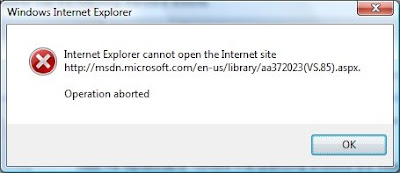
For several weeks now, I had been experiencing a problem in
Internet Explorer
(and just had not had time to research, or correct it). Almost every time I navigated to a page on
MSDN, the page would display briefly, I would get an
“Internet Explorer cannot open the Internet site http://msdn.microsoft.com/xxxx. Operation aborted” message, and then the page would be switched to a navigation error screen. I quickly discovered that pressing the back button would allow the page to display correctly.
Since I work with a lot of Microsoft products, and spend a lot of time on MSDN, this was becoming very annoying. So, today became the today to try and solve the problem. It was occurring on my work PC, but not my home PC. Both are running Windows Vista and IE7. Since one was ok, and the other was not, I thought the problem probably caused by an IE security setting. Rather than digging through IE’s huge list of security options for possible culprits, I decided to search the web to see if anyone else was experiencing the problem.
First, I found this
discussion listing a bug in sitemeter.com that had caused issues on a lot of sites; but this bug had already been corrected. The thread also suggested IE addins as a possible cause, but this was not the cause for my issue, either. Another suggestion in the thread was to Reset IE’s options, but this did not fix it for me either. There was also a link to a
blog post describing how this error is typically caused by
JavaScript manipulation of the HTML DOM. The post stated the problem has been corrected in IE8. Soooooo, I am now running a
beta of IE8, which seems to have corrected the problem. Hopefully, it does not introduce new problems!
On my next visit to
MSDN, I was promptly greeted with a JavaScript popup message that Microsoft was taking a survey(which was not appearing previously). So, it looks like the survey was the root of my problem, but I have not determined why it occurred on one PC and not the other. At least IE8 seems to have solved it, for now.


