Tuesday, February 14, 2012
June Rose Games
Tuesday, March 17, 2009
Verizon Network Extender
The Extender has been hooked up for a few days now, and so far it has been working great. Installation was simple, and phone calls have been crystal clear. My phone went from literally no service to four bars. The signal is strong throughout the entire house, including the basement and garage. If you’re interested, Verizon has a helpful installation video here.
If you live in cellular ‘dead zone’ like I do, I highly recommend the product.
Friday, January 9, 2009
Visual Studio and Auto Toolbox Populate
The only drawback to setting this to False, is now your user controls will not automatically appear in the Toolbox. At first, I found myself enabling/disabling the setting depending on if I needed to work with UI elemenets, or not. But, then I discovered a function under the Project menu, "Refresh Project Toolbox Items". This allows you refresh Toolbox on demand, instead of with every build. Problem solved.
Saturday, November 22, 2008
Tile Fill Addin

It can be useful for creating textures, or patterned backgrounds.
Friday, November 21, 2008
Radius Fill Corners Update
I now realize that it is better to restrict the radius, but base it on the current image's size. This way you should always get the desired results.
Here are updated links:
source code
addin dll
Sunday, November 9, 2008
New Paint.NET Effect Addin for rounding the corners of an image

Tuesday, November 4, 2008
Paint.NET community
What I had not realized until this week, is how great the community support for Paint.NET is. The application always just did what I wanted, so I had not taken the time to search for tips, tutorials, addins, etc. This week, I had a need to perform some more advanced task in Paint.NET, and found myself missing Photoshop’s capabilities. This lead me to search for some better ideas on how to accomplish the tasks I was working on. I quickly found out that there is a great community surrounding Paint.NET. There are tons of helpful blog posts on the net, and the Paint.NET forums are full of helpful users, tutorials, and free effect addins by developers such as Michael Sepcot, BoltBait, and Ed Harvey. This makes Paint.NET an even more useful product, and I’m looking forward to diving deeper into some of these community resources.
Wednesday, October 1, 2008
Remote Desktop Copy & Paste problem
I spend a lot of time working in Remote Desktop sessions, and lately I had noticed that quite often I would lose the ability to copy and paste text between my local machine and the Remote Desktop session. This finally became annoying enough that I decided to research the issue. After a quick Google search, the first link took me to a blog post by Pinal Dave that explained how to solve my exact problem. The summary is that the problem can be solved by following these steps in the Remote Desktop session:
1. Open Task Manager
2. Kill the “rdpclip.exe” process
3. Restart the process by using Start >> Run >> rdpclip.exe
This simple solution has saved me a lot of aggravation.
Wednesday, September 24, 2008
XNA Tutorials

Tuesday, September 9, 2008
The elusive Orca download
After the install completed, I happily navigated to Start->Microsoft Windows SDK -> Tools. Hmmm, no Orca in sight... I was just about to bite the bullet and run the full installer when I came across Aaron Stebner's blog post explaining how to get Orca, complete with a direct link for the software.
This saved me a lot of wasted time waiting on the download, just to use one small tool.
Monday, September 8, 2008
Browser shortcuts
I decided that a batch file might be an easy solution, and began researching IE’s command line options. While IE, does have a nice selection of options, unfortunately I could not get IE7 or IE8 to yield the results I wanted (the sites were opened in new windows instead of tabs). However, I got exactly what I wanted with Firefox (not a big issue because I routinely switch between the two browsers anyway). I just created the batch file in Notepad and saved it as a .bat file on my desktop. Here are example contents of the file:
cd\"Program Files (x86)\mozilla firefox\"
start firefox.exe http://www.cnn.com http://www.msn.com http://www.yahoo.com
After creating the batch file, it dawned on me that it would be easier to create a copy of my Firefox desktop shortcut, rename it appropriately, and then simply modify the shortcut’s target with the desired sites, as shown here:

Both methods are a great way to quickly navigate to a group of sites.
Thursday, September 4, 2008
Strings....
Friday, August 29, 2008
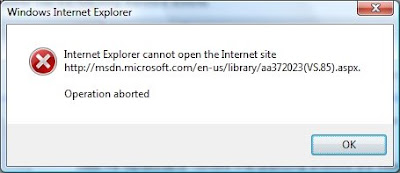
Internet Explorer operation aborted

For several weeks now, I had been experiencing a problem in Internet Explorer
Since I work with a lot of Microsoft products, and spend a lot of time on MSDN, this was becoming very annoying. So, today became the today to try and solve the problem. It was occurring on my work PC, but not my home PC. Both are running Windows Vista and IE7. Since one was ok, and the other was not, I thought the problem probably caused by an IE security setting. Rather than digging through IE’s huge list of security options for possible culprits, I decided to search the web to see if anyone else was experiencing the problem.
First, I found this discussion listing a bug in sitemeter.com that had caused issues on a lot of sites; but this bug had already been corrected. The thread also suggested IE addins as a possible cause, but this was not the cause for my issue, either. Another suggestion in the thread was to Reset IE’s options, but this did not fix it for me either. There was also a link to a blog post describing how this error is typically caused by JavaScript
On my next visit to MSDN, I was promptly greeted with a JavaScript popup message that Microsoft was taking a survey(which was not appearing previously). So, it looks like the survey was the root of my problem, but I have not determined why it occurred on one PC and not the other. At least IE8 seems to have solved it, for now.
Tuesday, August 26, 2008
VMWare Beeps
Open Windows Device Manager on the virtual machine.
Go to the View menu and pick “Show hidden devices”.
Go to Non Plug and Play Devices; there is now a Beep item that can be disabled.
Problem solved.
Experts Exchange and Google Cache
Today, a co-worker shared an interesting trick with me. It doesn’t always work, but most of the time, you can click on Google’s cached version of the page and the answers will appear. Nice!
XML Comments and Nullable data types
I had not worked with XML comments until joining my current employer. The syntax is pretty simple, and Visual Studio Intellisense handles most of it, but I occasionally find cases where the correct syntax is not obvious. For example, I needed to change an int variable to a nullable int. I updated the variable definition to int?, and changed the XML comment <see cref="int"/> to <see cref="int?"/>. This resulted in a compiler warning: “syntactically incorrect cref attribute 'int?'”. I searched, but could not find a complete listing of the correct syntax for all data types. Eventually, I found enough examples to learn that nullable data types are listed as Nullable{type name}, like <see cref="Nullable{DateTime}"/>, <see cref="Nullable{Int32}"/>, <see cref="Nullable{Bool}"/>, etc.
Thursday, August 14, 2008
Shortcuts revisited
Tuesday, August 12, 2008
Favorite Shortcut Keys
Visual Studio
(Note: some of these are different dependent upon your installation settings)
Control + g : Goto line number
Shift + Alt + Enter : Toggle full screen mode
Control + Space : Launch intellisense
Tab : Accept intellisense selection
F5 : Start debugging
F6 : Build
F10 : Step Over
F11 : Step Into
Windows
Windows Key + f : Search for documents
Windows Key + r : Run
Windows Key + m : Show the desktop (minimize all applications)
Alt + Tab : Toggle between applications
Most applications
Control + s : Save
Control + c : Copy
Control + v : Paste
Control + z : Undo
Control + n : New document
Control + x : Cut
Control + a : Select all
Control + h : Replace
Control + f : Find
Control + Tab - Toggle between documents
Thursday, August 7, 2008
iPhone-a-licious
Hearing about this software was one of those “blow your mind” moments for me. It is an amazing application of the iPhone’s technology, and also made me think about just how powerful the iPhone is. It will be interesting to see what other creative applications will become available for the phone. Gaming possibilities could be a huge use of the technology. While it’s not exactly a Nintendo Wii
It might be time to go phone shopping this weekend….
Tuesday, August 5, 2008
Quantity leads to Quality…
“When it comes to software, the same rule applies. If you aren't building, you aren't learning. Rather than agonizing over whether you're building the right thing, just build it. And if that one doesn't work, keep building until you get one that does.”
I found this to be an interesting post because I had recently came to the same conclusion. At my current employer there is a senior developer who is effectively my mentor (we’ll just call him Frank). He insists that all code should follow his standards, which is ok because they are typically good standards; but the whole thing can be a little intimidating. During my first few weeks at the employer, I had a difficult time completing any work because I was constantly worrying about “how would Frank handle this task?”. Once I overcame this, and just let the code flow, I have been much more productive and have learned more by writing the code as opposed to trying to over-analyze the existing code base.
Jeff suggests that the same idea of “Quantity always trumps quality” applies to blogging as well. As an aspiring blogger, I guess I should take that message to heart….


